














![[UK/EU Ship] AUTEL G-BOX2 Tool for Mercedes Benz All Keys Lost Work with Autel MaxiIM IM608 or IM508 with XP400](/upload/pro/21092316323891879576.jpg)
![[UK/EU Ship] AUTEL G-BOX2 Tool for Mercedes Benz All Keys Lost Work with Autel MaxiIM IM608 or IM508 with XP400](/upload/pro/20010815784678514644.jpg)
![[UK/EU Ship] AUTEL G-BOX2 Tool for Mercedes Benz All Keys Lost Work with Autel MaxiIM IM608 or IM508 with XP400](/upload/pro/20010815784678522749.jpg)
![[UK/EU Ship] AUTEL G-BOX2 Tool for Mercedes Benz All Keys Lost Work with Autel MaxiIM IM608 or IM508 with XP400](/upload/pro/20010815784678527234.jpg)
![[UK/EU Ship] AUTEL G-BOX2 Tool for Mercedes Benz All Keys Lost Work with Autel MaxiIM IM608 or IM508 with XP400](/upload/pro/20010815784678546141.jpg)
![[UK/EU Ship] AUTEL G-BOX2 Tool for Mercedes Benz All Keys Lost Work with Autel MaxiIM IM608 or IM508 with XP400](/upload/pro/20010815784678562129.jpg)
![[UK/EU Ship] AUTEL G-BOX2 Tool for Mercedes Benz All Keys Lost Work with Autel MaxiIM IM608 or IM508 with XP400](/upload/pro/20010815784678579863.jpg)
![[UK/EU Ship] AUTEL G-BOX2 Tool for Mercedes Benz All Keys Lost Work with Autel MaxiIM IM608 or IM508 with XP400](/upload/pro/20010815784678581873.jpg)
![[UK/EU Ship] AUTEL G-BOX2 Tool for Mercedes Benz All Keys Lost Work with Autel MaxiIM IM608 or IM508 with XP400](/upload/pro/20010815784678592762.jpg)
![[UK/EU Ship] AUTEL G-BOX2 Tool for Mercedes Benz All Keys Lost Work with Autel MaxiIM IM608 or IM508 with XP400](/upload/pro/20010815784678605037.jpg)
![[UK/EU Ship] AUTEL G-BOX2 Tool for Mercedes Benz All Keys Lost Work with Autel MaxiIM IM608 or IM508 with XP400](/upload/pro/20010815784678614596.jpg)
![[UK/EU Ship] AUTEL G-BOX2 Tool for Mercedes Benz All Keys Lost Work with Autel MaxiIM IM608 or IM508 with XP400](/upload/pro/20010815784678624908.jpg)
![[UK/EU Ship] AUTEL G-BOX2 Tool for Mercedes Benz All Keys Lost Work with Autel MaxiIM IM608 or IM508 with XP400](/upload/pro/20010815784678503462.jpg)


[UK/EU Ship] AUTEL G-BOX2 Tool for Mercedes Benz All Keys Lost Work with Autel MaxiIM IM608 or IM508 with XP400
Autel Software 50% OFF
New Lonsdor K518 Pro
BEST PRICE CONTACT US
Email: sales@cartool.co.uk
WhatsApp: +86 15271813909
Product Description
Highlights:
Supports fast mode on vehicle and bench when all keys of Mercedes-Benz vehicles using the Das3 EIS/EZS are lost.
Reads and writes Bosch engine ECU on F classis of BMW and MQB of Volkswagen.
With the Autel’s Advanced Diagnostic Tablets supporting IMMO and Key Programming functions.
Autel G-Box Adapter can work on Mercedes-Benz vehicles with DAS3 CAN EIS/EZS in AKL.
Compare with other adapter Autel G-Box Adapter is more effctive to reading the ECU data from W204 and W207 EISs.
AUTEL G-BOX Adapter can support Mercedes All Key Lost BMW DME Reading.
AUTEL G-BOX Adapter use with both the Autel MaxiIM IM608, IM508 and Auro IM600.
Autel G-Box Adapter is specially designed for Mercedez-Benz vehicles with DAS3 CAN EIS/EZS in AKL.
It helps to reduce the time for reading the ECU data from W204 and W207 EISs by over 85%.
Ship from UK&EU Warehouse, 2-3 days arrive!
Features:
Supports Mercedes Benz All Keys Lost, faster calculate password
Supports IM608 or IM508 with XP400
Used for Faster Mercedes ECU data and EIS password calculation
Mercedes DAS3 can EIS/EZS all keys lost
Reduces reading time of W204 ECU data & W207 EIS by over 85%
No need to remove and reinsert the key for W221 & W164 after 2009 models
Can read and write BMW DME/DDE ISN in boot mode
Compatible with Auro IM600 & Auro IM100 with XP400
Troubles and Troubleshooting:
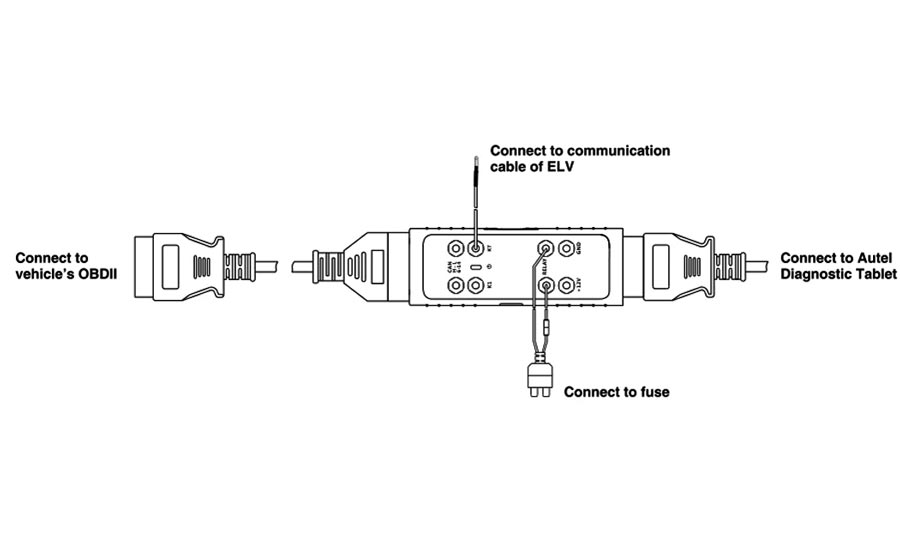
When all the keys of the Mercedes-Benz vehicle are lost, you can operate through the OBD.
Notice:This method is suitable for Mercedes-Benz W204, W207, W216 and W164 EISs after the year 2009.
Connection:
1. Connect the G-Box2 to vehicle' s OBDII
2. Remove the fuse of vehicle EIS, Connect the Relay ports to the fuse using the supplied fuse cable
3. When the vehicle has an ELV, connect the K7 port and ELV plug using the supplied K-line cable
4. Connect the G-Box2 to the Autel Diagnostic Tablet (MaxiIM IM608, IM508)
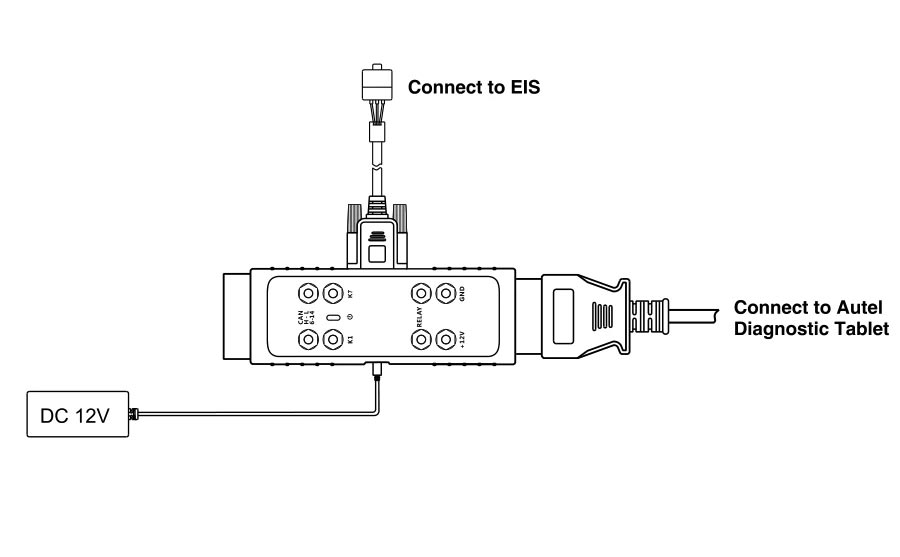
How to do on Bench When All Keys of Mercedes-Benz Vehicle are Lost
Notice:This Method is suitable for all Mercedes-Benz EISs that are already supported by Autel Diagnostic Tablet
Connection:
1. Plug the G-Box2 to the Mercedes-Benz EIS using the packed DB15 Cable
2. Plug to the DC port of G-Box2 using a power adapter (DV 12V)
3. Plug the G-Box2 to the Autel Diagnostic Tablet (MaxiIM IM608, IM508)
Package includes:
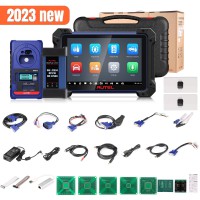
1PC x Autel G-BOX2
1PC x DB15 Cable
1PC x K-Line Cable
1PC x Fuse Cable
2PCs x Fuse (5A)
2PCs x Clamp Cable
1PC x OBDII Extension Cable
1PC x Quick Reference Guide
----------------------------------------------------------------------------------------------------------------------------------------
If you have any questions about the device, the price or the payment, please feel free to contact us.
E-Mail:Sales@carTool.co.uk
Skype:carTool.co.uk
Whatsapp: 86-15271813909
Shipping Method & Delivery
1) UK/EU Warehouse Shipping: 2-4 working days with No Tax. We have stock in our UK and EU warehouse for most items.
2) 4PX Express: 6 days with Tax Free for UK customers.The tax was pre-paid by us, when package reached, there's no tax no extra fee for customers.
3) Yanwen Express: 10-12 working days for European Countries. Our company have IOSS, declare under 150 EUR, seller pay tax, customers no need to pay tax, So usually no tax or extra fee for EU customers.
4) DHL Shipping: 3-5 working days. For the items have no stock in UK warehouse, we will ship it by DHL. We will declare a lower price on the invoice to help your clearance.
If you have not received the goods during the normal time, please contact us for checking the package status timely online or by email: sales@cartool.co.uk
Technical Support
If you cannot download software in the default CD, or if you need technical support for software install, please send email to sales@cartool.co.uk, we will help you by Teamviewer.