















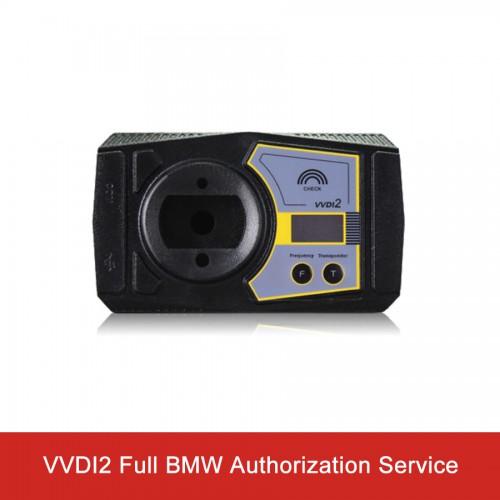

Xhorse VVDI2 Complete BMW Software Authorization
Autel Software 50% OFF
New Lonsdor K518 Pro
BEST PRICE CONTACT US
Email: sales@cartool.co.uk
WhatsApp: +86 15271813909
Product Description
Buy this package, you will get full BMW activated Software List:
1) VB-01 BMW OBD
2) VB-02 BMW CAS4
3) VB-03 BMW FEM/BDC
Note:
1. After you pay, please provide serial number of your VVDI2, we will open it for you within 24 hours.
2. No device, no need shipping, only authorization service.
3. If you need VAG Authorization, please check here.
4.If you need Toyota Authorization, please buy SV86-71.
5.If you need VVDI2 BMW Full function device, please buy SV86-D on our site.
Functions of VVDI2 BMW:
Unit coding
OBD key learn(CAS1/CAS2/CAS3/CAS3+)
File Make Key(CAS1/CAS2/CAS3/CAS3+/CAS4/CAS4+)
mileage correction,
read & write EWS/CAS EEPROM
synchronize DME-CAS, synchronize CAS-ELV
unlock key
CAS repaired etc
Fix CAS4 EEPROM key programmer
Generate specialized chips
Immobilizer data processing tool
Other key tools
Generate remote control
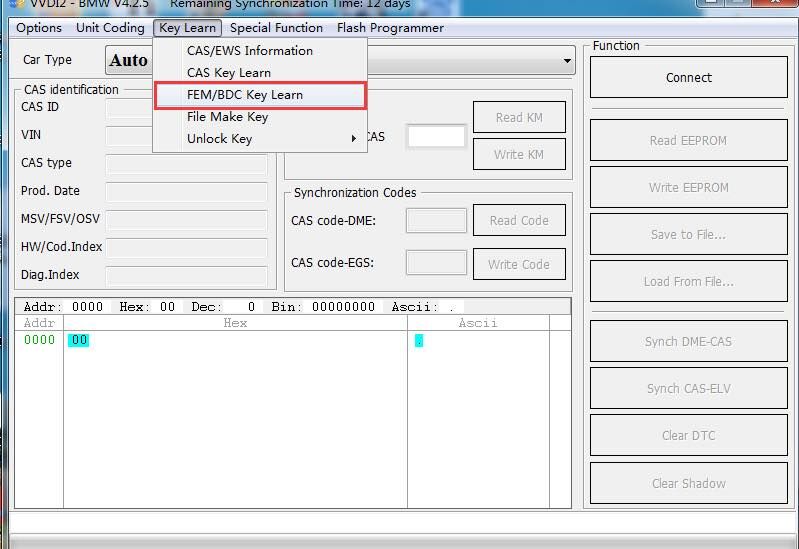
VVDI2 BMW FEM/BDC Function Authorization
VVDI2 - BMW FEM/BDC system(function released and available, just no user manual)
Users can refer to following information (3 steps for make keys:get key info->programming FEM/BDC system->make keys)
1.support make new key with ignition switch(support add spare key and all key lost, all key lost require ISN)
2.support reset FEM/BDC KM(cluster require reset manually)
3.support erase key(after erase the key position become blank position)
4.support backup coding
5.support restore coding
Notes:
1.backup coding and restore coding can direct operation generally.
2.add keys, reset KM, erase key must programming FEM/BDC system first
3.in FEM/BDC interface, if 'get key info' the type not support, it will show:customer should use "BMW E-sys software" program FEM/BDC system.
then programming FEM/BDC system with VVDI2-BMW
4.when operation on 'programming FEM/BDC system'interface,please don't close this software window until all procedures completed.
5.programming FEM/BDC system, require soldering and get eeprom.(FEM 95128 chip, BDC 95256 chip)usually there are 2 same chips on the module,
please refer to the software diagram, select the correct one.
6.programming FEM/BDC system,must restore the original eeprom, restore coding.if cannot restore coding or after restore coding assemble FEM/BDC module back to car,
but with problem(such as the remote control cannot start the car
or the car with window problem)please use "BMW E-sys software" coding for FEM/BDC system
7.if connect power to FEM/BDC module, but the relay keep ringing,please contact technical support for help.usually operation on FEM/BDC should be ok,just need to programming.
VVDI2 BMW FEM/BDC Function Authorization
VVDI2 - BMW FEM/BDC system(function released and available, just no user manual)
Users can refer to following information (3 steps for make keys:get key info->programming FEM/BDC system->make keys)
1.support make new key with ignition switch(support add spare key and all key lost, all key lost require ISN)
2.support reset FEM/BDC KM(cluster require reset manually)
3.support erase key(after erase the key position become blank position)
4.support backup coding
5.support restore coding
Notes:
1.backup coding and restore coding can direct operation generally.
2.add keys, reset KM, erase key must programming FEM/BDC system first
3.in FEM/BDC interface, if 'get key info' the type not support, it will show:customer should use "BMW E-sys software" program FEM/BDC system.
then programming FEM/BDC system with VVDI2-BMW
4.when operation on 'programming FEM/BDC system'interface,please don't close this software window until all procedures completed.
5.programming FEM/BDC system, require soldering and get eeprom.(FEM 95128 chip, BDC 95256 chip)usually there are 2 same chips on the module,
please refer to the software diagram, select the correct one.
6.programming FEM/BDC system,must restore the original eeprom, restore coding.if cannot restore coding or after restore coding assemble FEM/BDC module back to car,
but with problem(such as the remote control cannot start the car
or the car with window problem)please use "BMW E-sys software" coding for FEM/BDC system
7.if connect power to FEM/BDC module, but the relay keep ringing,please contact technical support for help.usually operation on FEM/BDC should be ok,just need to programming.
----------------------------------------------------------------------------------------------------------------------------------------
If you have any questions about the device, the price or the payment, please feel free to contact us.
E-Mail:Sales@carTool.co.uk
Skype:carTool.co.uk
Whatsapp: 86-15271813909
Shipping Method & Delivery
1) UK/EU Warehouse Shipping: 2-4 working days with No Tax. We have stock in our UK and EU warehouse for most items.
2) 4PX Express: 6 days with Tax Free for UK customers.The tax was pre-paid by us, when package reached, there's no tax no extra fee for customers.
3) Yanwen Express: 10-12 working days for European Countries. Our company have IOSS, declare under 150 EUR, seller pay tax, customers no need to pay tax, So usually no tax or extra fee for EU customers.
4) DHL Shipping: 3-5 working days. For the items have no stock in UK warehouse, we will ship it by DHL. We will declare a lower price on the invoice to help your clearance.
If you have not received the goods during the normal time, please contact us for checking the package status timely online or by email: sales@cartool.co.uk
Technical Support
If you cannot download software in the default CD, or if you need technical support for software install, please send email to sales@cartool.co.uk, we will help you by Teamviewer.